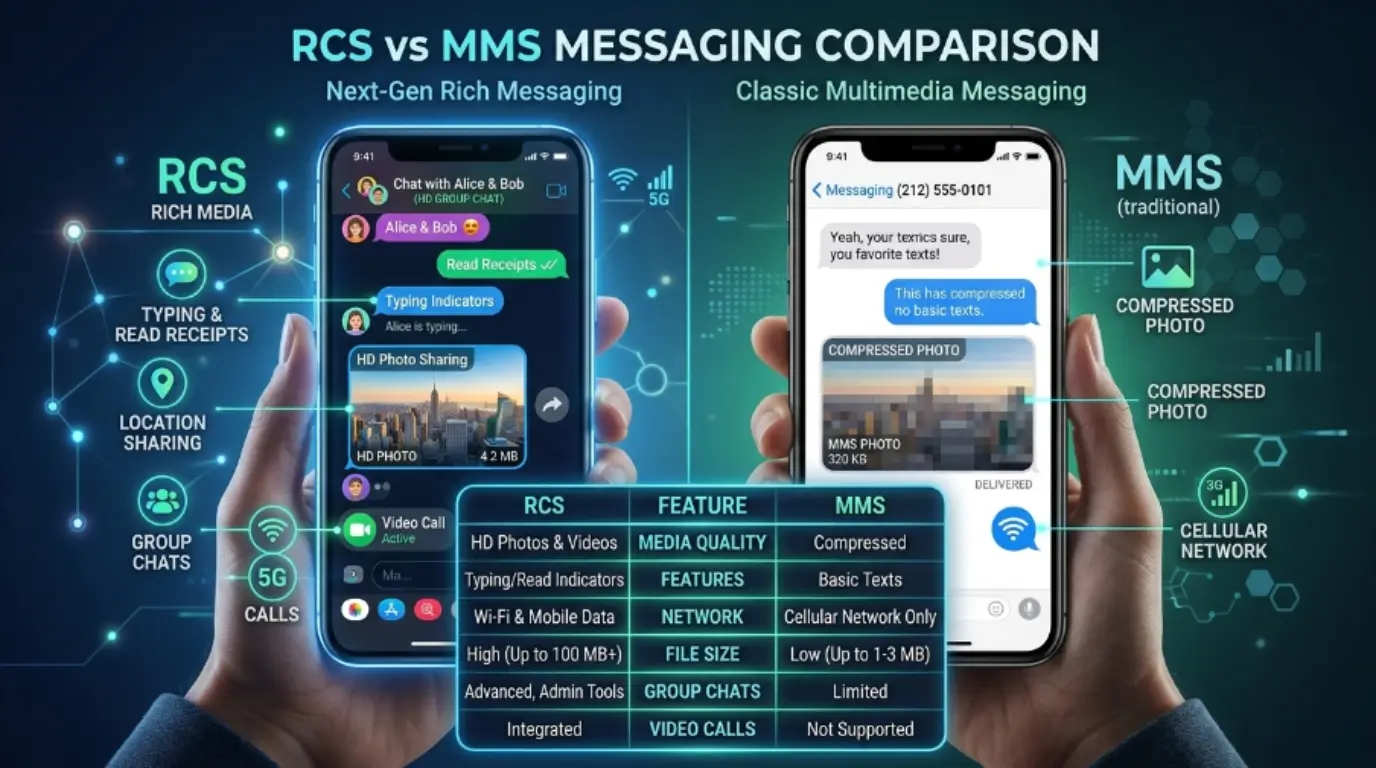
Imagine you want to send a photo from your smartphone to a friend. Years ago, the only option was MMS, which often reduced image quality and had strict file size limits.
Today, many smartphones use RCS, a modern messaging technology that offers richer features and a better user experience.
Understanding the difference between RCS and MMS is important because both technologies are still widely used in mobile communication.
The difference between RCS and MMS affects message quality, speed, functionality, and user experience. Many people are confused about which technology their phone uses and why messages behave differently.
This guide explains the difference between RCS and MMS in simple terms, helping beginners, students, professionals, and technology enthusiasts understand these messaging systems clearly.
Key Difference Between RCS and MMS
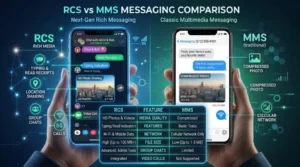
The primary difference is that RCS (Rich Communication Services) is an internet-based messaging protocol with advanced features, while MMS (Multimedia Messaging Service) is a traditional cellular messaging service designed mainly for sending multimedia content.
- RCS works through mobile data or Wi-Fi.
- MMS works through the mobile carrier’s network.
- RCS supports advanced chat features.
- MMS supports basic multimedia messaging.
Why Is Their Difference Necessary to Know?
Understanding the difference between RCS and MMS helps users choose the best communication method for different situations.
For learners:
- Helps understand modern communication technology.
- Improves digital literacy.
For professionals:
- Assists in business communication planning.
- Helps optimize customer messaging services.
For society:
- Supports faster and richer communication.
- Encourages adoption of modern messaging standards.
Pronunciation
RCS
| Accent | Pronunciation |
| US | ar-see-es |
| UK | ar-see-es |
MMS
| Accent | Pronunciation |
| US | em-em-es |
| UK | em-em-es |
Before diving deeper, let’s explore the detailed differences between these two messaging technologies.
10 Major Differences Between RCS and MMS
1. Technology Used
RCS
Uses internet connectivity.
Examples:
- Sending messages through Wi-Fi.
- Using mobile data for chat features.
MMS
Uses cellular carrier networks.
Examples:
- Sending photos without internet.
- Multimedia delivery through mobile service.
2. Message Quality
RCS
Supports high-quality media.
Examples:
- HD photos.
- High-resolution videos.
MMS
Compresses files significantly.
Examples:
- Reduced image quality.
- Lower video resolution.
3. Character Limits
RCS
Allows longer messages.
Examples:
- Detailed project discussions.
- Long customer support conversations.
MMS
Has limited message capacity.
Examples:
- Short multimedia captions.
- Basic text attachments.
4. Read Receipts
RCS
Provides read receipts.
Examples:
- Seeing when a friend reads a message.
- Business customer confirmation.
MMS
Does not support read receipts.
Examples:
- No delivery tracking.
- No read confirmation.
5. Typing Indicators
RCS
Shows typing status.
Examples:
- Seeing someone typing.
- Live conversation feedback.
MMS
No typing indicators.
Examples:
- Traditional messaging experience.
- Delayed communication awareness.
6. Group Chats
RCS
Supports advanced group chats.
Examples:
- Office team discussions.
- Family group conversations.
MMS
Offers limited group messaging.
Examples:
- Basic group texts.
- Limited participant features.
7. Internet Requirement
RCS
Requires Wi-Fi or mobile data.
Examples:
- Home Wi-Fi messaging.
- Mobile internet chatting.
MMS
Requires cellular service.
Examples:
- Carrier network transmission.
- Traditional mobile messaging.
8. Security
RCS
Offers better security features.
Examples:
- Modern encryption support.
- Improved privacy controls.
MMS
Uses older security standards.
Examples:
- Basic carrier security.
- Limited protection mechanisms.
9. File Sharing Capacity
RCS
Supports larger files.
Examples:
- Large presentations.
- High-quality video sharing.
MMS
Limited file size support.
Examples:
- Small images.
- Short video clips.
10. User Experience
RCS
Feels similar to modern chat apps.
Examples:
- Interactive messaging.
- Rich communication features.
MMS
Feels like traditional texting.
Examples:
- Basic multimedia messages.
- Simpler messaging functions.
Nature and Behaviour of Both
RCS
Nature:
- Modern
- Interactive
- Internet-driven
Behaviour:
- Dynamic communication
- Real-time interaction
- Feature-rich messaging
MMS
Nature:
- Traditional
- Carrier-based
- Multimedia-focused
Behaviour:
- Simple communication
- Basic media transfer
- Limited interaction features
Why Are People Confused About Their Use?
People often confuse RCS and MMS because both can send photos, videos, and multimedia content. Modern messaging apps automatically switch between technologies depending on device compatibility, internet availability, and carrier support. As a result, users may not realize whether their message was sent through RCS or MMS.
Difference and Similarity Table
| Feature | RCS | MMS | Similarity |
| Messaging | Advanced | Basic | Both send messages |
| Media Sharing | High quality | Compressed | Both share media |
| Internet | Required | Not required | Both communicate users |
| Read Receipts | Yes | No | Both deliver messages |
| Group Chats | Advanced | Limited | Both support groups |
| Typing Indicators | Yes | No | Both enable conversation |
| File Size | Large | Small | Both share files |
| Security | Better | Basic | Both transmit information |
| User Experience | Modern | Traditional | Both support communication |
| Device Support | Newer devices | Almost all phones | Both are mobile technologies |
Which Is Better in What Situation?
RCS Is Better
RCS is better when you need high-quality media sharing, real-time conversations, read receipts, typing indicators, and advanced group chats. It works best for modern smartphone users with internet access.
MMS Is Better
MMS is better when internet access is unavailable or when communicating with older devices that do not support RCS. It remains useful for broad compatibility across mobile networks.
How the Keywords Are Used in Metaphors and Similes
RCS
Metaphors:
- RCS is the sports car of messaging.
- RCS is a digital bridge between people.
Similes:
- Fast like a modern social app.
- Smooth like a live conversation.
MMS
Metaphors:
- MMS is the old postal service of messaging.
- MMS is a classic road connecting mobile users.
Similes:
- Reliable like an old friend.
- Simple like a handwritten note.
Connotative Meaning
RCS
Positive:
- Modern
- Fast
- Innovative
Negative:
- Requires internet
- Limited support in some regions
Neutral:
- Messaging protocol
MMS
Positive:
- Reliable
- Widely compatible
Negative:
- Limited features
- Lower quality media
Neutral:
- Multimedia messaging service
Idioms or Proverbs Related to Communication
While there are no direct idioms for RCS or MMS, these communication-related expressions apply:
- A picture is worth a thousand words.
- Keep in touch.
- Get the message across.
- Speak volumes.
- On the same wavelength.
Examples:
- The HD photo sent through RCS proved that a picture is worth a thousand words.
- MMS helped them keep in touch during travel.
Works in Literature Mentioning Similar Messaging Technologies
Since RCS is relatively new, direct literary references are rare.
RCS
- No major literary works currently focus specifically on RCS technology.
MMS
- Modern digital communication studies and technology textbooks discuss MMS extensively.
Movies Related to Messaging and Mobile Communication
Movies Featuring Mobile Messaging Themes
- Textuality (2011, Canada)
- Disconnect (2012, USA)
- Men, Women & Children (2014, USA)
- Searching (2018, USA)
- Missing (2023, USA)
Frequently Asked Questions
1. What is the main difference between RCS and MMS?
RCS uses internet connectivity and offers advanced messaging features, while MMS uses carrier networks for basic multimedia messaging.
2. Does RCS replace MMS?
RCS is gradually replacing MMS, but MMS remains important for compatibility with older devices.
3. Can RCS send higher-quality photos?
Yes, RCS supports much higher-quality image and video sharing than MMS.
4. Does MMS require internet?
No. MMS works through the cellular carrier network.
5. Which is more secure, RCS or MMS?
RCS generally offers better security and privacy features than MMS.
How Both Are Useful for Surroundings
RCS improves communication by providing richer interactions, better media quality, and real-time engagement. It supports modern digital lifestyles and business communication.
MMS remains useful because it works across a wide range of devices and networks, ensuring people can still exchange multimedia content even without advanced messaging support.
Conclusion
The difference between RCS and MMS comes down to technology, features, and user experience.
RCS represents the future of messaging with internet-based communication, high-quality media sharing, read receipts, typing indicators, and advanced group chats.
MMS, on the other hand, continues to serve as a dependable multimedia messaging service that works across nearly all mobile devices.
Both technologies remain valuable in today’s communication landscape. RCS is ideal for users seeking modern messaging features, while MMS ensures compatibility when internet access or device support is limited.
Understanding their strengths and limitations helps users choose the right messaging option for every situation.