Imagine buying a new laptop and noticing that one device offers amazing battery life while another delivers powerful performance for gaming and heavy software.
The secret often lies in the processor architecture inside the machine. Understanding the difference between ARM and x86 helps users make smarter technology decisions.
The difference between ARM and x86 is one of the most important topics in modern computing.
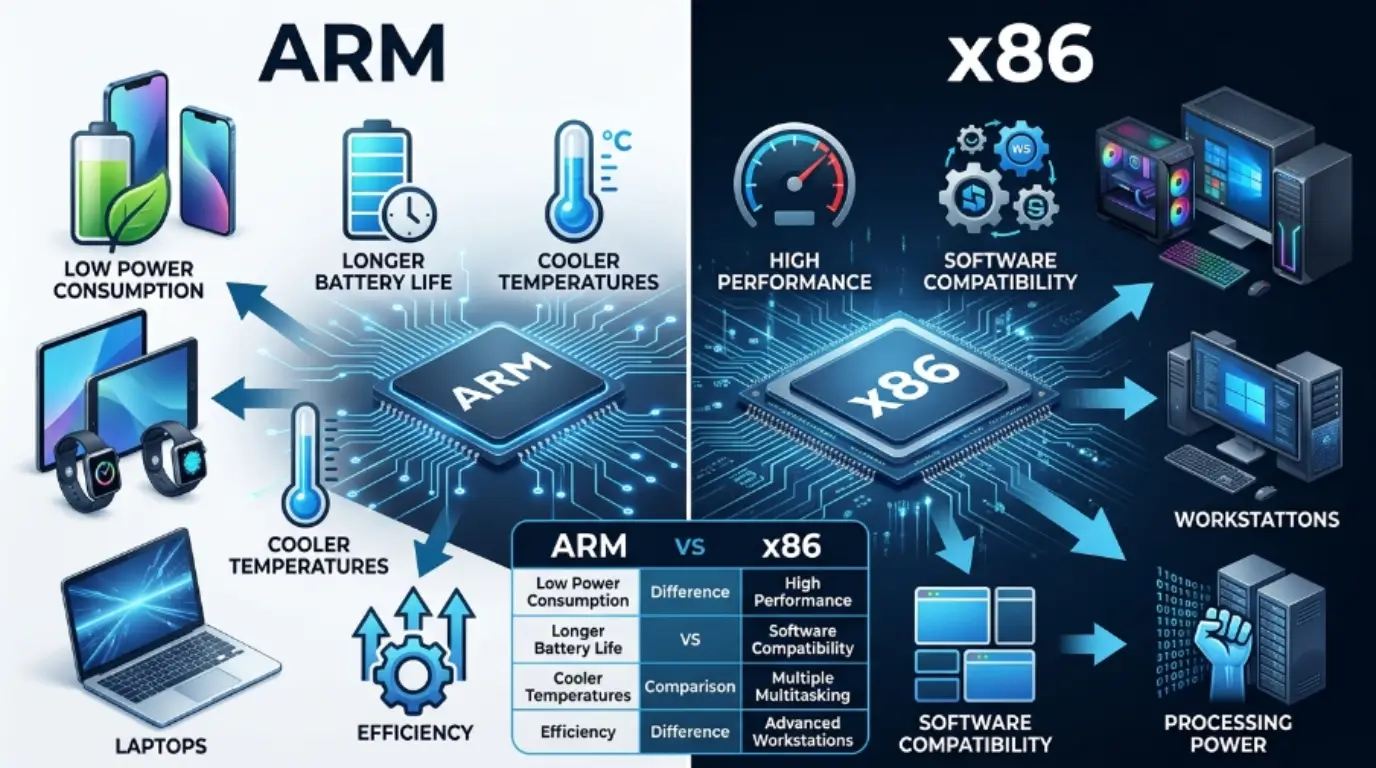
ARM processors are commonly found in smartphones, tablets, and energy-efficient laptops, while x86 processors dominate desktop computers, gaming PCs, and many servers.
As technology evolves, the difference between ARM and x86 becomes increasingly relevant for students, professionals, developers, and tech enthusiasts.
This guide explains the difference between ARM and x86 in simple language, covering their features, uses, similarities, and practical applications.
Key Difference Between ARM and x86
The main difference is that ARM uses a Reduced Instruction Set Computing (RISC) architecture designed for efficiency and lower power consumption, while x86 uses a Complex Instruction Set Computing (CISC) architecture designed for maximum performance and compatibility.
Why Is Their Difference Important?
Understanding ARM and x86 is important because processor architecture affects:
- Battery life
- Performance
- Software compatibility
- Device cost
- Heat generation
- Future technology trends
Students, developers, engineers, businesses, and consumers benefit from knowing which architecture best fits their needs.
Pronunciation
| Term | US Pronunciation | UK Pronunciation |
| ARM | /ɑːrm/ | /ɑːm/ |
| x86 | /eks eɪti sɪks/ | /eks eɪti sɪks/ |
Before exploring their differences in detail, let’s examine the characteristics that make each architecture unique.
Difference Between ARM and x86
1. Instruction Set Design
ARM
ARM uses a simplified instruction set.
Examples:
- Smartphones using ARM chips
- Smartwatches using ARM processors
x86
x86 uses a more complex instruction set.
Examples:
- Gaming PCs
- Workstations running engineering software
2. Power Consumption
ARM
Consumes less power and extends battery life.
Examples:
- Apple MacBook Air
- Android smartphones
x86
Generally consumes more power.
Examples:
- Desktop gaming computers
- High-performance laptops
3. Performance Focus
ARM
Optimized for efficiency and balanced performance.
Examples:
- Tablet processors
- Embedded systems
x86
Optimized for raw computing power.
Examples:
- Intel Core processors
- AMD Ryzen processors
4. Heat Generation
ARM
Produces less heat.
Examples:
- Fanless laptops
- Mobile devices
x86
Usually generates more heat.
Examples:
- Gaming desktops
- High-end workstations
5. Software Compatibility
ARM
May require software adaptation.
Examples:
- ARM-based Windows laptops
- Mobile applications
x86
Supports vast amounts of legacy software.
Examples:
- Microsoft Office on PCs
- Professional CAD software
6. Common Device Usage
ARM
Dominates mobile devices.
Examples:
- iPhones
- Samsung Galaxy devices
x86
Dominates desktops and servers.
Examples:
- Office computers
- Enterprise servers
7. Manufacturing Philosophy
ARM
Licenses designs to manufacturers.
Examples:
- Qualcomm Snapdragon
- MediaTek Dimensity
x86
Primarily produced by Intel and AMD.
Examples:
- Intel Core series
- AMD Ryzen series
8. Cost Efficiency
ARM
Often cheaper to implement.
Examples:
- Budget smartphones
- IoT devices
x86
Usually costs more in powerful systems.
Examples:
- Gaming rigs
- Professional workstations
9. Scalability
ARM
Scales efficiently across many device types.
Examples:
- Smart TVs
- Smart home devices
x86
Scales effectively in performance-heavy systems.
Examples:
- Data centers
- Scientific computing machines
10. Market Presence
ARM
Leads the mobile computing market.
Examples:
- Mobile phones
- Wearables
x86
Leads traditional computing markets.
Examples:
- Personal computers
- Enterprise infrastructure
Nature and Behaviour of ARM and x86
ARM
ARM focuses on efficiency, mobility, and low power usage. It is designed to maximize battery life while maintaining adequate performance. ARM processors are commonly associated with portable devices and modern energy-conscious computing.
x86
x86 focuses on compatibility, flexibility, and high performance. It supports decades of software development and remains the preferred choice for demanding workloads such as gaming, video editing, and enterprise applications.
Why Are People Confused About ARM and x86?
People often confuse ARM and x86 because both perform the same fundamental task of processing computer instructions. Modern ARM chips can match or exceed some x86 processors in performance, making distinctions less obvious. Additionally, many operating systems now run on both architectures, increasing confusion among users.
ARM vs x86: Differences and Similarities
| Feature | ARM | x86 | Similarity |
| Architecture | RISC | CISC | Both process instructions |
| Power Usage | Low | Higher | Both require power |
| Performance | Efficient | Powerful | Both offer computing power |
| Heat Output | Lower | Higher | Both generate heat |
| Software Support | Growing | Extensive | Both run applications |
| Usage | Mobile devices | PCs and servers | Both power digital devices |
| Manufacturers | Multiple licensees | Intel and AMD | Both have global markets |
Which Is Better and When?
ARM Is Better When
ARM is better for smartphones, tablets, lightweight laptops, embedded systems, and devices where battery life matters most. Users who prioritize portability, efficiency, and quiet operation often benefit from ARM-based devices.
x86 Is Better When
x86 is better for gaming, professional software, engineering applications, video editing, scientific computing, and enterprise environments. Users needing maximum compatibility and performance often prefer x86 systems.
ARM and x86 as Metaphors and Similes
ARM
Positive Meaning
- Efficient like a bicycle on a crowded street.
- Quiet as a whisper in a library.
Neutral Meaning
- Balanced like a well-planned budget.
Negative Meaning
- Limited like a compact toolbox for large projects.
x86
Positive Meaning
- Powerful like a freight train.
- Strong as a heavy-duty machine.
Neutral Meaning
- Reliable like an old family car.
Negative Meaning
- Hungry for power like a large engine.
Connotative Meanings
| Term | Positive | Negative | Neutral |
| ARM | Efficient, modern, portable | Limited compatibility | Energy-focused |
| x86 | Powerful, reliable, versatile | Higher power usage | Performance-focused |
Idioms and Proverbs Related to ARM and x86
There are no direct idioms specifically for ARM or x86. However, related technology expressions include:
- Work smarter, not harder
- Power under the hood
- Built like a machine
- The engine behind success
- Running on all cylinders
Works in Literature Featuring ARM or x86
While these technical terms rarely appear as central literary subjects, they are discussed in technology publications.
ARM
- ARM System Developer’s Guide — Computer Science — Andrew N. Sloss — 2004
- ARM Assembly Language — Educational Technology — William Hohl — 2014
x86
- The Art of Assembly Language — Technical Education — Randall Hyde — 2010
- Modern X86 Assembly Language Programming — Computer Science — Daniel Kusswurm — 2014
Movies and Documentaries Related to Computing Technologies
ARM Related
- Revolution OS — 2001 — USA
- Code Rush — 2000 — USA
x86 Related
- Silicon Cowboys — 2016 — USA
- General Magic — 2018 — USA
Frequently Asked Questions
What is the biggest difference between ARM and x86?
ARM focuses on power efficiency, while x86 focuses on performance and software compatibility.
Is ARM faster than x86?
Not always. Performance depends on the specific processor and workload.
Why do smartphones mostly use ARM?
ARM offers excellent battery life and lower heat generation.
Can Windows run on ARM?
Yes. Modern versions of Windows support ARM processors.
Which architecture is better for gaming?
x86 remains the preferred architecture for most gaming systems.
How Are Both Useful in Our Surroundings?
ARM powers the devices people carry every day, including smartphones, tablets, smartwatches, and smart home products. Its efficiency makes modern mobile technology possible.
x86 powers desktops, gaming computers, servers, business systems, and professional workstations. Its performance enables demanding tasks that support industries, education, research, and entertainment.
Conclusion
The difference between ARM and x86 comes down to efficiency versus performance. ARM architecture excels in low-power environments and mobile computing, making it ideal for smartphones, tablets, and lightweight laptops. Its energy-efficient design helps extend battery life while reducing heat generation.
On the other hand, x86 architecture remains the leader in desktop computing, gaming, professional workloads, and enterprise systems.
Its strong software compatibility and high-performance capabilities make it a reliable choice for demanding applications.
Understanding the strengths and limitations of both architectures helps users choose the right device for their specific needs and ensures better technology decisions in an increasingly digital world.